





Internet-focused alternative in Chrome PCs
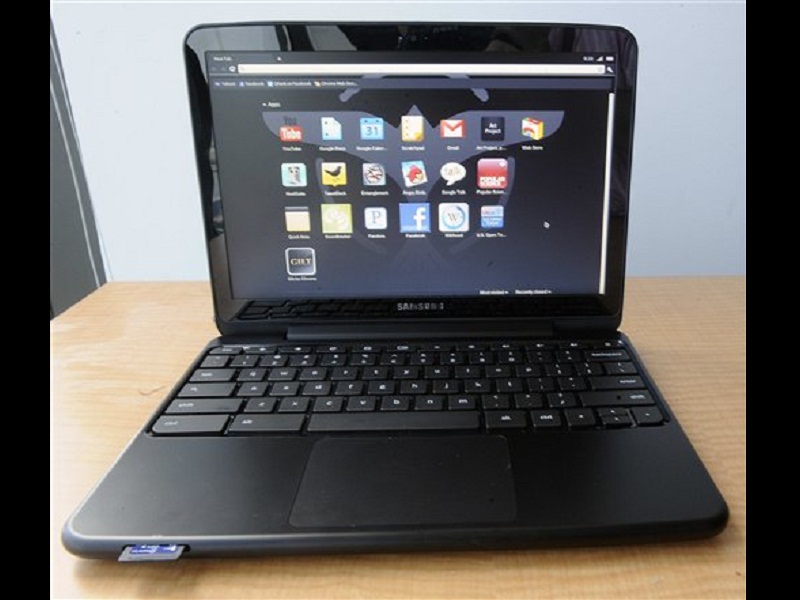
In this July 13, 2011 photo, Samsung’s new Chromebook laptop is shown, in Atlanta. Ga. The laptop offers a new approach in portable computing. It presents all of the user’s experience, from websites to apps to gaming to productivity tools, through Google’s Chrome browser and underlying Linux-based operating system. AP/Mike Stewart
ATLANTA—Two new computers running Google’s Chrome operating system are looking to lure people to a browser-based environment. Both target light-duty computer users who don’t need the full range of capabilities that traditional Windows and Mac computers provide.
The first thing to know about these machines is they lack regular hard drives for storage. There’s a small amount of flash memory available, the kind you’d find on a camera memory card, but Chrome OS machines are designed for the cloud. That means documents are stored over the Internet, and programs are run over the Internet through a Web browser.
However securely and discretely the Internet services you use claim to keep your data, your content is one step removed from your tight-fisted control. Cloud computing also limits what you can do during those times you may not have an Internet connection.
In addition, because the machines emphasize not just cloud storage but cloud services as well, you won’t be able to install full-blown programs such as Microsoft’s Office. You’re limited to the selection of apps written for Chrome.
What you get instead is speed. The Chrome OS machines boot up quickly because they don’t have to load a lot of software — all that is run over the Internet. The machines also don’t need the most expensive and fastest parts because they aren’t doing a whole lot.
If you’re OK with that approach to personal computing, the Chromebook laptop and the Chromebox desktop computer hit the mark. Both are made by Samsung Electronics Co. and represent the second-generation of Chrome OS machines, following the models out last summer.
Here’s a closer look at the two:
Chromebook
Officially called the Samsung Series 5 550, the $449 Chromebook laptop is an updated version of last year’s debut Chromebook model.
As notebooks go, the Chromebook is sleek and simple by appearance. It sports a 12.1-inch display, weighs a tidy 3.3 lbs and has built-in Wi-Fi. The model I tested also came with a 3G cellular modem and two years of free online connection to Verizon’s network. That model costs $549.
Under the hood is an Intel Celeron processor and four gigabytes of RAM, which is plenty for most Web-based activities. There’s a paltry 16 gigabytes of flash storage, which can quickly get eaten up if you store a lot of songs or photos — forget about lengthy video. Again, the idea is for you to keep all that on the Internet instead.
Google’s Chrome Web store has plenty of useful, free applications to run on the machine. These are the same apps that you can add to Chrome Web browsers running on Windows or Mac computers. The selection includes accounting software, Amazon.com wish list management and “Angry Birds” (Yes, they’re still angry).
But if all of that can also be installed for Chrome on a Mac or Windows machine, why have a whole computer with the entire functionality dedicated to one browser? Isn’t that severely limiting?
Some will find it is, but others will soon determine that the vast majority of their activities in front of a computer screen are Web-based anyway. There are Chrome apps for Netflix, Facebook, Twitter, Flickr and other services that represent the bulk of the casual user’s computer time.
The frustrations I had with Chromebook were related to its hardware. First, there is no caps lock key. I had to simultaneously press the shift key and a key with a magnifying glass right above it. That may seem like a small inconvenience, but Chrome just made it more cumbersome for me to yell at someone in ALL CAPS on Facebook.
Also, the touchpad’s right-click sensitivity was poorly calibrated and dominated a good two-thirds of the surface. Hence, a right-click dropdown window of options kept popping up when I merely meant to left click on text fields and other objects. These are small things, of course, but they were annoying.
Chromebox
The $329 Chromebox Series 3 desktop computer, by comparison, a real gem.
The diminutive unit sports lots of crucial connections, including six USB 2.0 ports, a DVI output and two DisplayPort outputs for the transmission of high-resolution video to an external display. Like the Chromebook, it comes with 16 gigabytes of storage.
The first thing I noticed when powering up the Chromebox was, well, nothing. It was the quietest electrical device in my home office, thanks to a flash drive that doesn’t need to spin, unlike magnetic hard drives found in most traditional computers. The unit generates very little heat and therefore doesn’t need a roar of fans to move that heat away from the 1.9 GHz Intel processor.
The desktop experience is identical to the Chromebook, of course. They run the same OS and operate in the same fashion.
I was able to use the quietness to my advantage. The Chromebook is quiet, too, but the Chromebox is more inviting because you’re more likely to leave it in one place. That makes it easier to use the device for entertainment, as I wouldn’t need to reconnect wires to the TV each time.
It’s much nicer to stream high-definition Netflix movies to the TV from the mouse-quiet Chrome device than from my PlayStation 3, Xbox 360 or a regular desktop PC, all of which get warm and loud.
And I’d get a proper browser and online apps on the television, instead of apps repurposed for the game console experience. For instance, the Twitter app for Xbox is cartoonish, whereas reading a few tweets from TweetDeck via Chrome (with a Bluetooth keyboard attached) is pretty nice.
That said, I see neither Chromebook nor the Chromebox as replacements for traditional computers, as cloud computing isn’t fully robust yet. Instead, Chrome OS machines are likely to be additions, the way you might buy an iPad to supplement your main desktop or laptop.
If you’re comfortable with cloud computing, the Chromebook and the Chromebox deliver a clean networked experience and give you a full keyboard than touch-screen tablets lack.
But the new Chrome OS machines, while improved over previous models, don’t offer many advantages over traditional computers that can do much more. So if you’re not comfortable yet with cloud storage, there’s no reason to force yourself to embrace Chrome OS. You can get by with the Chrome browser on a regular machine.


